FAQs - Downloading Walks and Peak Bagging Maps (PDFs)
Q. I've opened an account, logged on successfully and requested a walk pdf. The file download window opens showing three options (Open, Save, Cancel). I've selected the 'open' option but am getting an error message saying that the file can not be found.
There is bug with some releases of Internet Explorer Version 6 (IE6) which causes this problem with the Acrobat browser plug-in. The work around is to Save the pdf file rather than opening it.
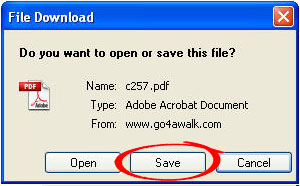
To do this, close the Acrobat window and go back to the page from which you selected the walk. Click on the Get Walk icon again but this time choose the Save option.
The pdf will download directly onto your desktop or into the folder you have set-up for downloads.
Note. This window containing these Open, Save, Cancel options may be behind your current open window.
Q. Help! I've forgotten my password
See FAQs - Passwords
Q. How do I change my Account details such as my email address and/or password.
Complete this form with your old email address, your new email address and your old password and your new password.
NB. We manually review ALL requests for changes to accounts.
Q. Everytime I try to download a walk I am asked to log on again - even though I have a valid Account and have already logged on.
Q. I can log on and it says the walk is downloading - but the walk pdf doesn't arrive.
Can you open this test document? (Clicking the link will automatically download a test pdf document to your downloads folder or wherever you have chosen to store downloads).
If you cannot, this could be for a number of reasons:

1. You do not have the correct version of Adobe Acrobat (version 5.0 or higher).
You need to upgrade to Adobe Acrobat Reader version 5.0 or higher:
NB. You normally need to reboot your computer once installation is complete.
2. You have the correct version of Adobe Acrobat Reader but it, or your browsers' plug-in, has become corrupt. To solve this you need to reinstall Adobe Acrobat Reader:
PDF stands for Portable Document Format and is created by Adobe Acrobat Software. Documents in PDF preserve the exact look and content of the originals, complete with fonts and graphics, and they can be distributed by e-mail or stored on the internet, an intranet, a file system, or a CD for other users to view on Microsoft®, Windows®, Mac OS®, and UNIX®, platforms.
Q. Why do I need Acrobat Reader?
Acrobat PDF can only be read by Acrobat Reader. Acrobat Reader is freely available as a stand alone program or as a plug-in for Internet Explorer, Mozilla Firefox, Opera and Safari.
Q. Which version Acrobat Reader do I need?
go4awalk.com walks are only compatible with Acrobat Reader 5.0 and above. Please make sure you have the latest version installed on your computer.
Q. Where can I get the latest version of Acrobat Reader?
Adobe Acrobat Reader is available FREE from Adobe Systems. To download the latest version for your computer click on the "Get Acrobat Reader" icon and follow the on screen instructions. Acrobat Reader is also freely available on most computer magazine cover CD's. NB. You normally have to restart your computer to use the new software.
Q. When I print go4awalk.com walks some of the border detail is missing?
Either open a go4awalk.com walk with Acrobat Reader or from within your internet browser using the acrobat plug in.
Select Print... from the File Menu.
Then select Acrobat Reader from the pull down menu and check the 'Fit to Page' box.