FAQs - AOL 8.0 and Pop-Up Controls
You are probably looking at this page because you are an AOL 8.0 user who has recently Open an Account/Subscribed to go4awalk.com and every time you try to download a walk, the browser asks you to log on again - despite the fact you have already logged on. This is a known problem with AOL and we are in touch with AOL regarding the matter.
In the meantime, the simplest solution is to use an alternative browser - such as Internet Explorer. This comes pre-installed on most computers, is available free on most Computer/Internet Magazine Cover CD's or available online from this link. Please Note: You can use any browser to access the internet via your AOL account - not just the version of the browser supplied by AOL.
If you cannot (or don't want to) use an alternative browser then you'll need to reset the preferences in your AOL browser to accept pop-ups. This is quite easy.
Firstly, some background. The problem centres around the use of pop-up windows. When you are browsing the internet some sites produce small (and usually very annoying) windows in addition to the main window. These small windows are called pop-ups. The method sites use to produce these pop-ups usually involves a piece of javascript code such as javascript window.open() or javascript:openWin().
go4awalk.com does not use pop up windows (because we think they are really annoying too). However, to ensure only current and qualified Account Holders/subscribers can access the walk collection, go4awalk.com does use the javascript:openWin() code. It is this section of code that AOL 8.0's pop up controls are suppressing - resulting in our system being unable to recognise you as a legitimate Account Holder/subscriber.
AOL offers plenty of control over pop-ups and there are three possibilities:

Allow pop-ups - this will allow go4awalk.com to operate.

Block pop-ups - which will be effective but undiscriminating - and will not allow go4awalk.com to operate.

Allow specific sites - which will allow go4awalk.com to operate if the domain is included in the allowed list.
At start-up there are no web windows opened, and none of the controls illustrated below are visible. The controls may be accessed in two different, but connected, ways.
- By clicking on a small area in the bottom bar of the web window - providing the window is maximised. The AOL 8.0 windows appear to resize to less than maximum size every time a user clicks on or opens another non-AOL window.
- By accessing a dialog box, either by inputting AOL 'keywords' into the address bar, or by selecting a menu option from the shortcut menus which appear when the small areas are clicked.
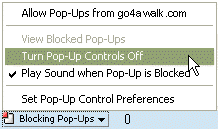 1. Click on [Blocking Pop-Ups]
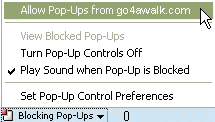 1. Click on [Blocking Pop-Ups]

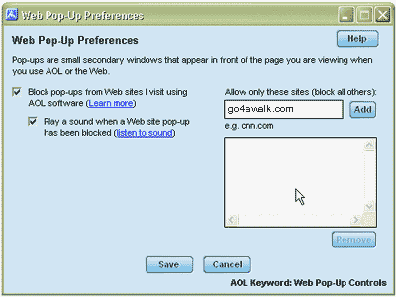

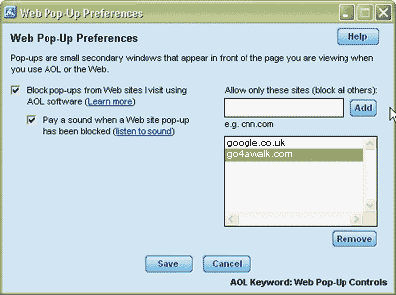
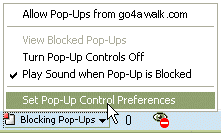
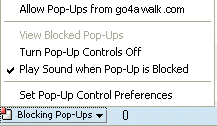 Two ways to set/unset this feature:
 With this set a user at least get some indication that a window has been blocked.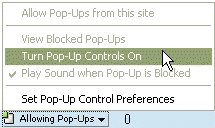


To contribute to go4awalk.com or to contact us about anything at all - see Talk To Us. For help see Help.
go4awalk.com and go4awalk.co.uk are registered trademarks of TMDH Limited.
Copyright © 2000-2025 TMDH Limited. All rights reserved.
Copyright Terms & Conditions Privacy Statement
A - Z Walks Home Log On/Accounts Photo Gallery Walk Ideas and Collections Fell Facts Hill Skills Walking Questions and Answers Your Stories News Competitions Product Reviews/Gear Tests Walking Gear Guides Peaks and Mountains Peak Bagging Find New Walking Friends Camping GPS Waypoints for Walking Contents Walk Search Talk To Us go4awalk.com Help Free Example Walks Newsletter